
Kube-VIP as TCP/UDP Load Balancer for RKE2
On this page

This guide sets up kube-vip in Layer 2 (ARP) mode on an RKE2 cluster for two jobs: a virtual IP for the RKE2 control plane, and external IPs for Services of type: LoadBalancer.
For ingress on RKE2 (Traefik by default from v1.36), see the Ingress on RKE2 guide.
Overview
What is Kube-VIP?
kube-vip provides virtual IPs for Kubernetes clusters without an external load balancer. In Layer 2 mode, the elected leader node answers ARP for the VIP, so all traffic for that address lands on one node at a time and moves to another node on failure.
Key Features
- Control plane VIP: A single stable address for the Kubernetes API (6443) and the RKE2 supervisor (9345) across all server nodes. This is the “fixed registration address” the RKE2 HA guide asks for.
- Service load balancer: Assigns and advertises addresses for Services of
type: LoadBalancer, with IP pools managed by the kube-vip cloud provider. - Failover: Leader election moves the VIP when the active node fails.
Layer 2 mode is failover, not load spreading: one node receives all traffic for a given VIP. For true multi-node load spreading, use BGP mode or an external load balancer.
For more details, visit the kube-vip documentation.
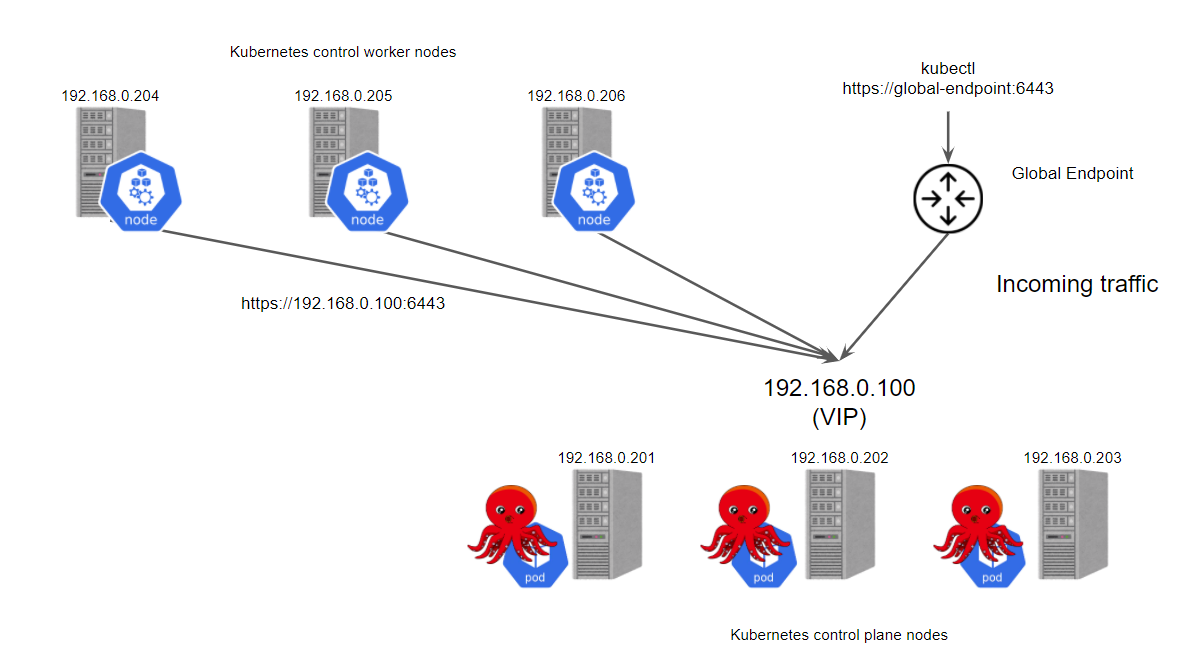
Setup Instructions
The steps follow the kube-vip DaemonSet installation guide. Pick a free VIP on the node subnet (this example uses 192.168.1.100) and note the node interface name (for example eth0).
Step 1: Add the VIP to the RKE2 Certificates
On every server node, add the VIP (and any DNS name for it) to tls-san in /etc/rancher/rke2/config.yaml before starting RKE2:
tls-san:
  - 192.168.1.100
  - rke2.example.com
Step 2: Generate the kube-vip Manifests
kube-vip’s RBAC manifest and DaemonSet must be in place before the other nodes join. RKE2 applies any manifest in /var/lib/rancher/rke2/server/manifests/ on startup, so place them there on the first server.
RBAC (ServiceAccount, ClusterRole, ClusterRoleBinding):
bashcurl -sL https://kube-vip.io/manifests/rbac.yaml \ -o /var/lib/rancher/rke2/server/manifests/kube-vip-rbac.yamlDaemonSet. Generate it with the kube-vip image from any machine with Docker or Podman. Pin a release; v1.2.4 is used here:
bashexport VIP=192.168.1.100 export INTERFACE=eth0 export KVVERSION=v1.2.4 docker run --network host --rm ghcr.io/kube-vip/kube-vip:$KVVERSION \ manifest daemonset \ --interface $INTERFACE \ --address $VIP \ --inCluster \ --taint \ --controlplane \ --services \ --arp \ --leaderElection > kube-vip.yamlCopy
kube-vip.yamlto/var/lib/rancher/rke2/server/manifests/kube-vip.yamlon the first server.--controlplaneadvertises the control plane VIP.--servicesmakes kube-vip advertise ServiceLoadBalanceraddresses.--inClusterand--taintrun kube-vip with its ServiceAccount and pin the pods to control plane nodes.
Start the first server, then confirm kube-vip is running and the VIP answers:
bashkubectl -n kube-system get pods -l app.kubernetes.io/name=kube-vip-ds -o wide curl -k https://192.168.1.100:6443/versionThe label selector can differ between kube-vip versions;
kubectl -n kube-system get dsshows the DaemonSet name if it does not match.
Step 3: Join the Other Servers Through the VIP
Because the leader node owns the whole VIP, both the supervisor (9345) and the API (6443) are reachable on it. Join the remaining servers and all agents with:
server: https://192.168.1.100:9345
token: <shared-secret>
Use three servers (an odd number) so etcd keeps quorum when one fails.
Step 4: Test Failover
- Find the current leader. kube-vip records it in a Lease in
kube-system(namedplndr-cp-lockfor the control plane by default):bashkubectl -n kube-system get lease - Check ARP from another host on the same network:bash
arp -a | grep 192.168.1.100 - Shut down the leader node and confirm
curl -k https://192.168.1.100:6443/versionkeeps answering after a few seconds, with the ARP entry now pointing at a different MAC.
Service LoadBalancer Addresses
With --services enabled, kube-vip advertises any address set on a Service through the kube-vip.io/loadbalancerIPs annotation or spec.loadBalancerIP. To have addresses assigned automatically from a pool, install the kube-vip cloud provider:
kubectl apply -f https://raw.githubusercontent.com/kube-vip/kube-vip-cloud-provider/main/manifest/kube-vip-cloud-controller.yamlThen define pools in the kubevip ConfigMap in kube-system. range-global and cidr-global apply to all namespaces; range-<namespace> or cidr-<namespace> limits a pool to one namespace:
apiVersion: v1
kind: ConfigMap
metadata:
  name: kubevip
  namespace: kube-system
data:
  range-global: 192.168.1.200-192.168.1.220
The manifest URL above tracks the project’s main branch; for production, download it once and commit a reviewed copy to your GitOps repository.
Example: Expose Traefik Through a kube-vip Address
On RKE2, Traefik binds host ports 80 and 443 and its Service is ClusterIP. To give it a dedicated VIP instead of relying on node IPs, switch the Service to LoadBalancer with a HelmChartConfig and request a fixed address:
apiVersion: helm.cattle.io/v1
kind: HelmChartConfig
metadata:
  name: rke2-traefik
  namespace: kube-system
spec:
  valuesContent: |-
    service:
      spec:
        type: LoadBalancer
      annotations:
        kube-vip.io/loadbalancerIPs: "192.168.1.200"
DHCP-Assigned Addresses
The kube-vip Service documentation describes requesting a Service address from a DHCP server by setting kube-vip.io/loadbalancerIPs: "0.0.0.0". Static addresses are easier to put in DNS and firewall rules, so prefer them unless your network team requires DHCP.
Deploying Kube-VIP via ArgoCD
The control plane VIP must exist before Argo CD can run, so keep the control plane DaemonSet in the RKE2 manifests directory as shown above. Manage the cloud provider and its ConfigMap with Argo CD by committing the reviewed manifests to Git:
apiVersion: argoproj.io/v1alpha1
kind: Application
metadata:
  name: kube-vip-cloud-provider
  namespace: argocd
spec:
  destination:
    namespace: kube-system
    server: https://kubernetes.default.svc
  project: load-balancers
  source:
    repoURL: https://git.example.com/platform/cluster-services.git
    targetRevision: main
    path: kube-vip-cloud-provider
  syncPolicy:
    automated:
      prune: true
      selfHeal: true
Integration with RKE2
- kube-vip gives RKE2 the fixed registration address its HA guide requires, without a hardware load balancer.
- Traefik, the default RKE2 ingress from v1.36, can be reached either on the host ports 80 and 443 of every node or through its own kube-vip Service address as shown above. See the Ingress on RKE2 guide.
- Do not run kube-vip Service advertisement and MetalLB on the same Services. Pick one Service load balancer per cluster.